Spatial web windows
Spatial web windows treat auxiliary browser surfaces — histogram palettes, curve remotes, inspectors — as first-class parts of a web application, physically separated on the desktop so users can manage working memory with mechanistic cues, not one flat SPA canvas.
In plain language: tear tools off into lite windows; keep them wired to the same work.
Core claim
Professional desktop software (Capture One, GIMP, NLE suites) separates the model (canvas, timeline) from controls about the model (histogram, curves, transport). The web converged on single-viewport SPAs; WASM and WebGPU fixed compute, not spatial ergonomics.
Preferred shape:
-
Viewport window — engine work (WebGPU/WebGL canvas, or DOM primary surface)
-
Lite palette windows — DOM-native controls in chromeless popups or Document Picture-in-Picture
-
Shared state hub —
SharedWorkerorBroadcastChannelso palettes are projections, not duplicate apps -
Intent routing — layout follows display intent (desktop vs mobile), not raw viewport width
Why it exists
Logins and OAuth already use popups as signals back to the opener.
Core product UI rarely does — not because the platform forbids it, but because popup blockers, mobile parity, COOP/noopener, and SPA frameworks optimized for one document root.
Physically separating UIs is a powerful cue for human working memory:
-
Lock down the parent context while exploring a sub-task in a satellite window
-
Remote control metaphor — functions about the model live beside the model, not on top of it
-
Layering and spatial indexing — CAD, NLE, and desktop windowing solved this decades ago
Forcing everything into one 2D global mental context — except basic modals — strains reasoning.
Anti-pattern — monolithic viewport
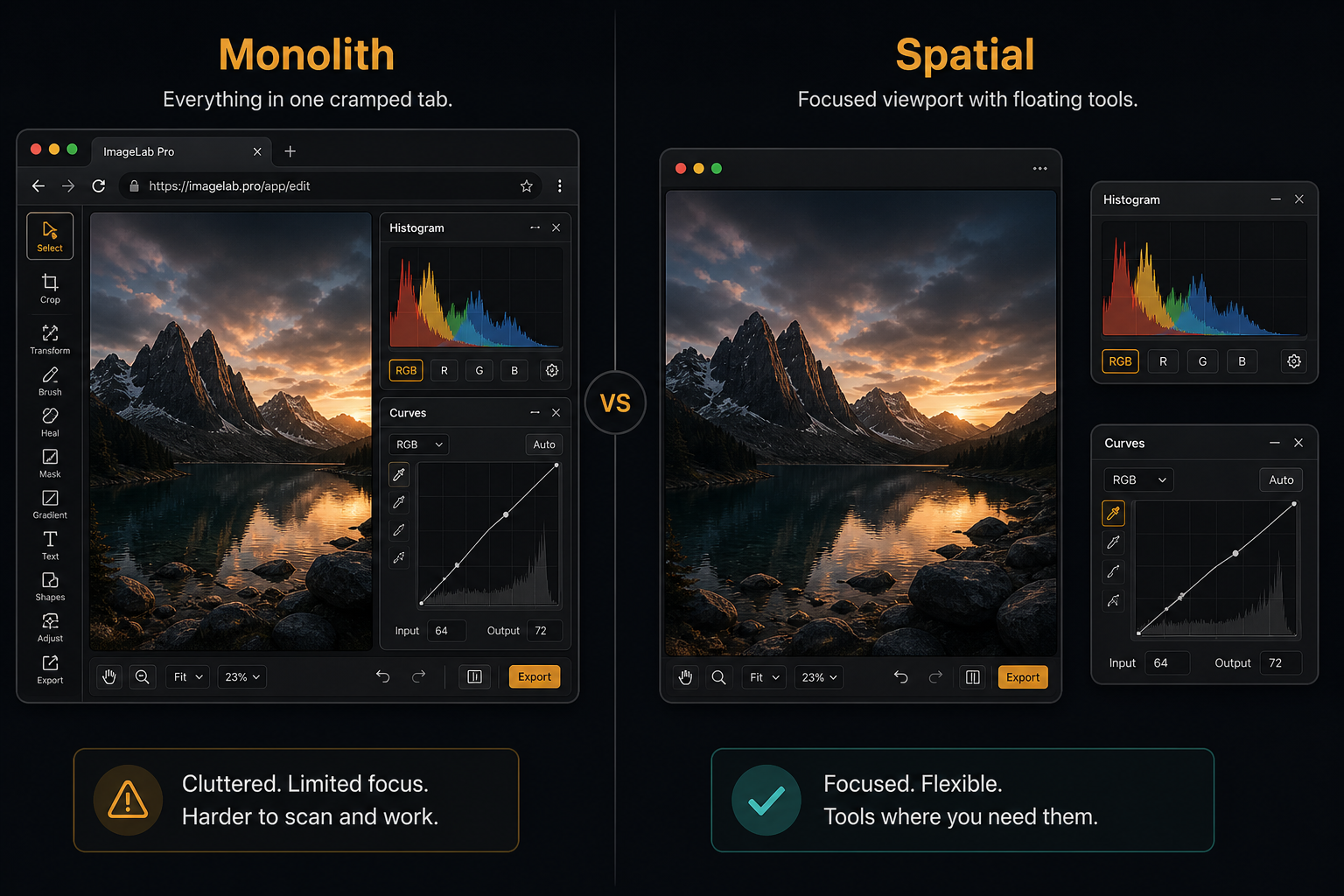
One tab holds canvas, histogram, curves, and toolbar. The user holds every tool relationship in working memory because nothing in the chrome says this window is the remote for that viewport.
Preferred shape — spatial layout
Same workflow with a main viewport and torn-off lite windows for histogram and curves. Each surface has a clear job; OS window boundaries reinforce context boundaries.
Communication patterns
Same-origin (direct)
When popup and opener share origin, synchronous access via window.opener is possible — but couples event loops and garbage collection.
Prefer decoupled channels even when same-origin.
Cross-origin (OAuth, connectors)
postMessage with origin verification is the standard pattern.
After redirect back to app origin, BroadcastChannel can replace a stale opener handle.
Decoupled coordination (recommended)
| Mechanism | Role |
|---|---|
|
Headless state daemon; palettes and viewport subscribe to deltas |
|
Lightweight pub/sub for selection and mode events |
DOM portals |
|
Window Management API |
|

Lite window primitives
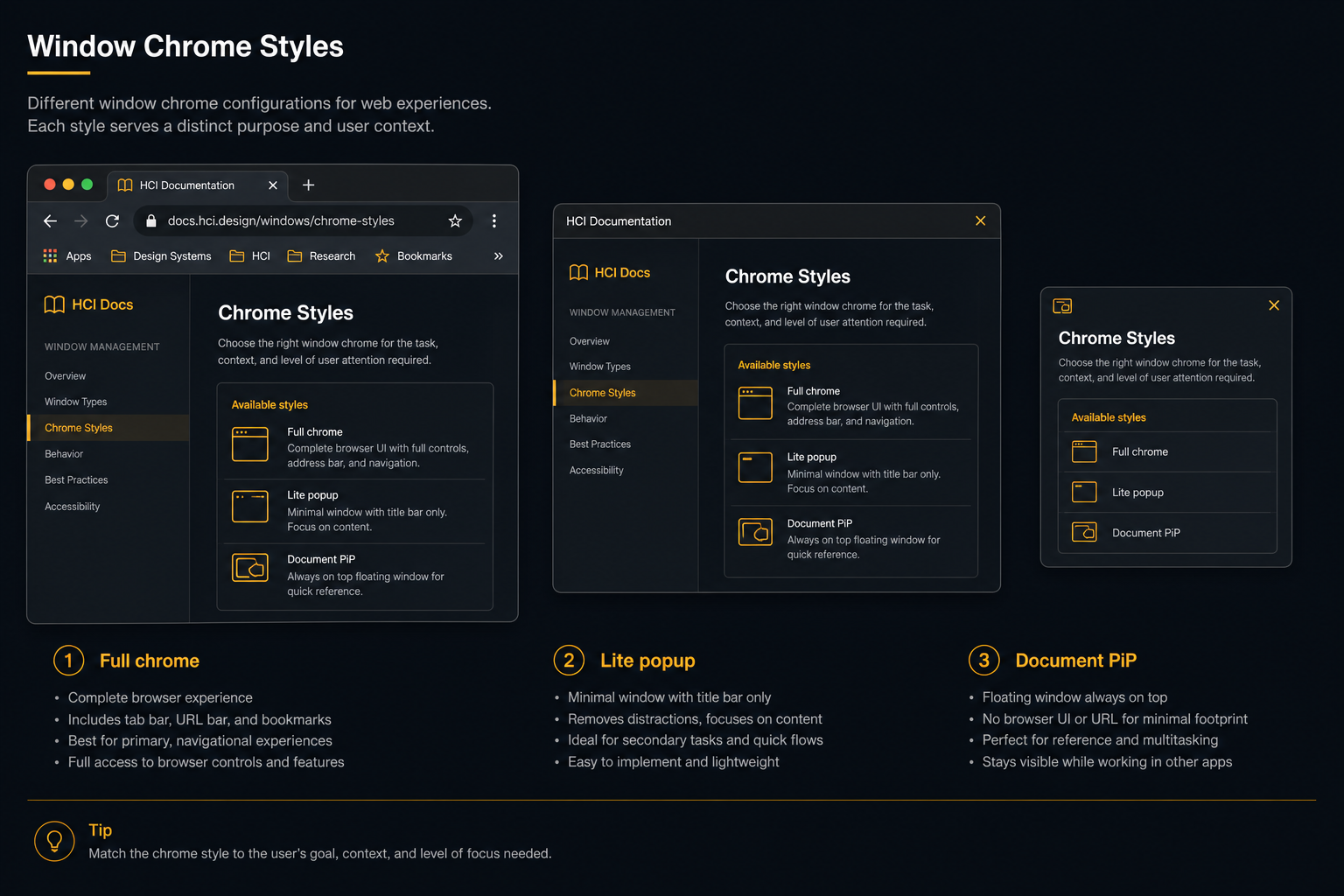
| API | Behavior |
|---|---|
Document Picture-in-Picture |
|
Chromeless |
Feature string |
Window Controls Overlay |
PWA manifest |
Intent routing
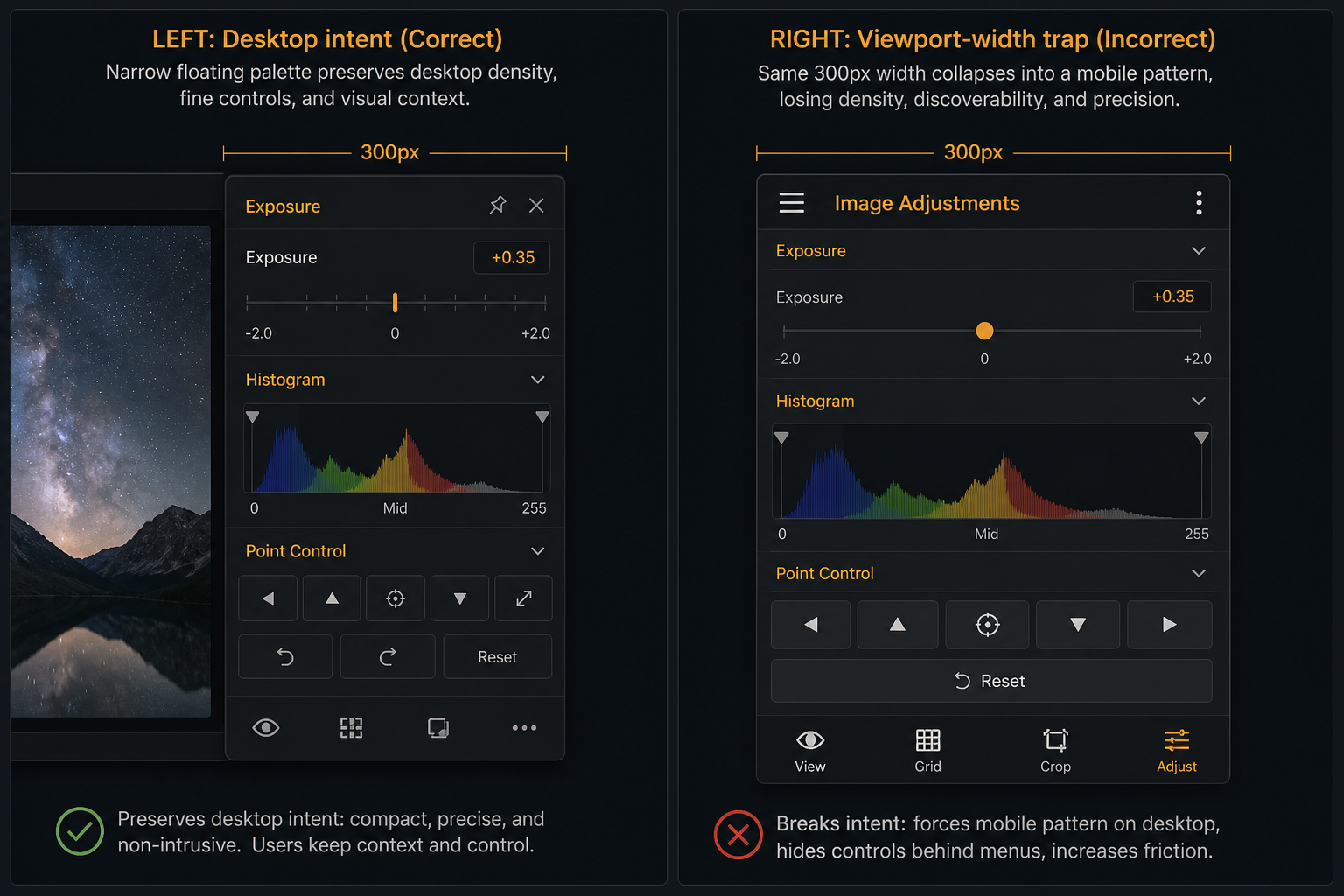
Responsive CSS keyed only to @media (max-width: …) breaks multi-window desktop apps.
A 250px-wide utility window must not become a hamburger-menu mobile layout.
Use explicit display intent:
-
desktop— palettes as lite windows; resize adjusts tool density only -
mobile— palettes collapse to bottom sheets / drawers (deferred polish in early demos)
Guard with @media (pointer: fine) and @media (any-hover: hover) — fine pointer on a large monitor keeps desktop density even in narrow windows.
Browser sandbox impediments
-
Background throttling — focusing a palette throttles the viewport’s
requestAnimationFrameand timers -
No parent-relative always-on-top — OS treats popups as peer windows; inspector cannot reliably float above its parent only
-
Tab bar coupled to window stack — switching tabs hides sibling surfaces under the same browser profile
-
COOP /
noopener— security defaults severwindow.openerunless explicitly managed -
Single main thread — unless workers isolate work, heavy viewport repaint drops palette input frames
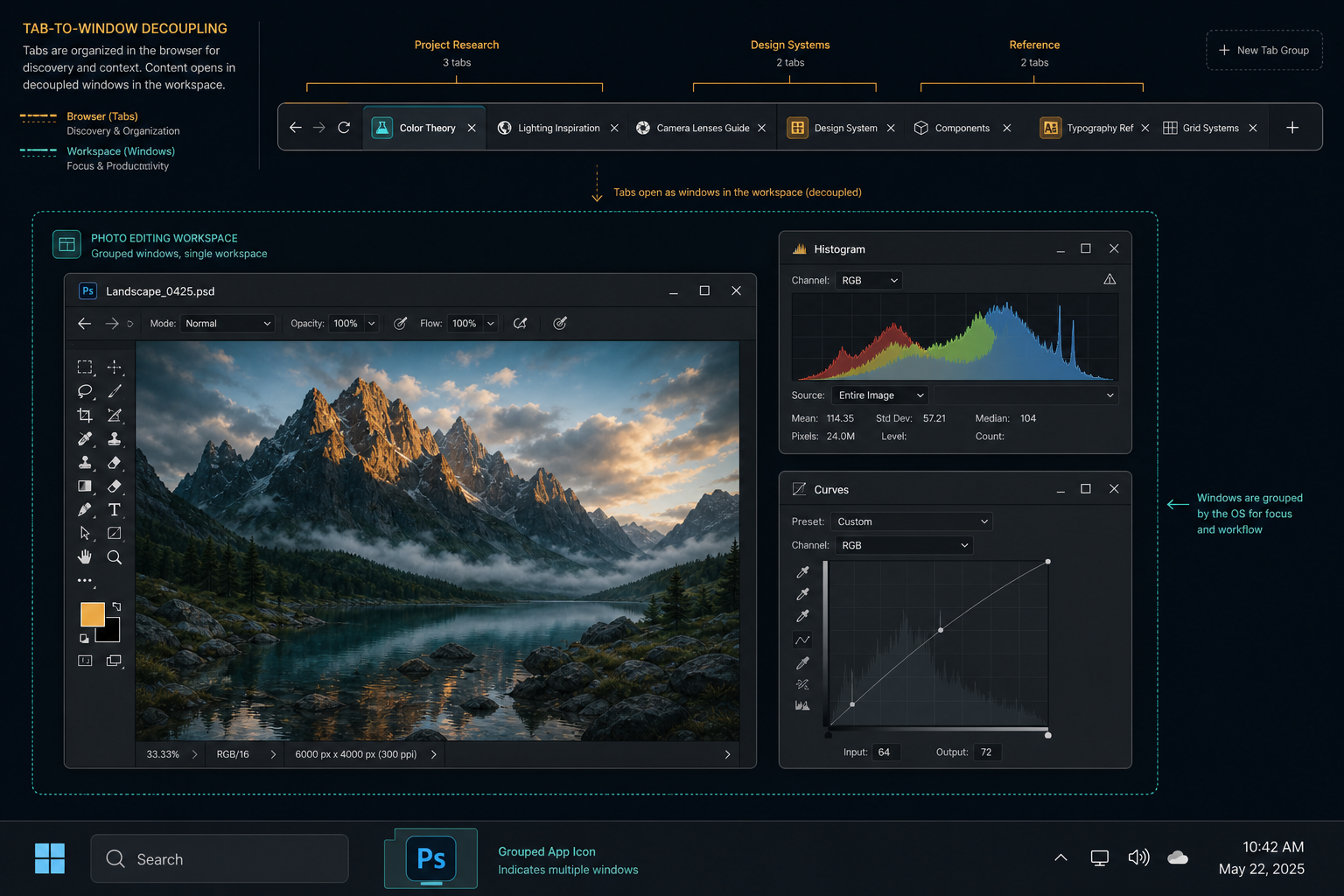
Browser-level fixes for workspace grouping, parent-relative always-on-top, and reduced throttling among workspace peers are tracked in Desktop-Tooling/spatial-browser (Chromium fork).
WASM and professional software
The canvas sandbox trap: developers reimplement windowing inside WebGL (Dear ImGui, custom toolkits) because DOM felt too rigid.
Spatial web windows invert that:
-
WASM/WebGPU engine in viewport (or
OffscreenCanvasin worker) -
Inspector and control palettes as lite DOM windows
-
State sync via
SharedArrayBufferor worker byte buffers
Developers building UI-heavy web apps: see Dev-Centr — Spatial windows and lite palettes.
Relationship to scoped UX
Scoped UX architecture keeps tools small with hard boundaries. Spatial web windows let each scoped tool occupy its own OS window while sharing one shell via the state hub — the remote-control pattern at platform scale.
Fundamental contexts — layout/placement context can span multiple document roots when the controller and IR stay shared.
Non-goals
-
Replacing mobile single-viewport flows (intent routing converts desktop → mobile separately)
-
Every popup as a new browser tab in the general tab strip
-
Bypassing popup blockers without user activation
-
Claiming stock browsers already deliver parent-anchored palettes without fork patches
Prototype
-
Blog essay: When the browser flattens working memory
-
Demo: Spatial web windows desk
-
Browser fork: Desktop-Tooling/spatial-browser
Related
-
Context-bound settings — dependent surfaces beside activity