 HCI Nerdz
When settings live across town
Settings that leave the here-and-now force users to rebuild mental context from scratch. Context-bound settings treat configuration as a dependent process that follows the activity UI — not a storage room behind other businesses.
One of the biggest problems with apps — and web apps in particular — is that you cannot tell what a setting will do, because the settings surface has to recreate the mental context you already held while working. That tax is at its worst in systems like Google Admin Console and cloud consoles: deep trees, walls of toggles, and a long walk back to the thing you were actually changing.
I want a settings paradigm where only the settings applicable to what you are doing show up in that moment — in a separate UI from the activity, but bound to it. Desktop apps sometimes get closer (inspectors, property sheets), but they still often dump you into a menu that demands rebuilding context from scratch. The missing piece is inference: the settings surface has to know which state the main UI is in, and adapt.
Settings become a dependent process — a sidebar of configuration that follows the activity, not a destination you visit when work is already over.
The storage room across town
Once a control exceeds the here and now of the activity, products shove it into the digital equivalent of a storage room across town, hidden behind other businesses: Settings → Organization → Advanced → Network, three columns of unrelated knobs, and a Save bar that pretends this was one decision.
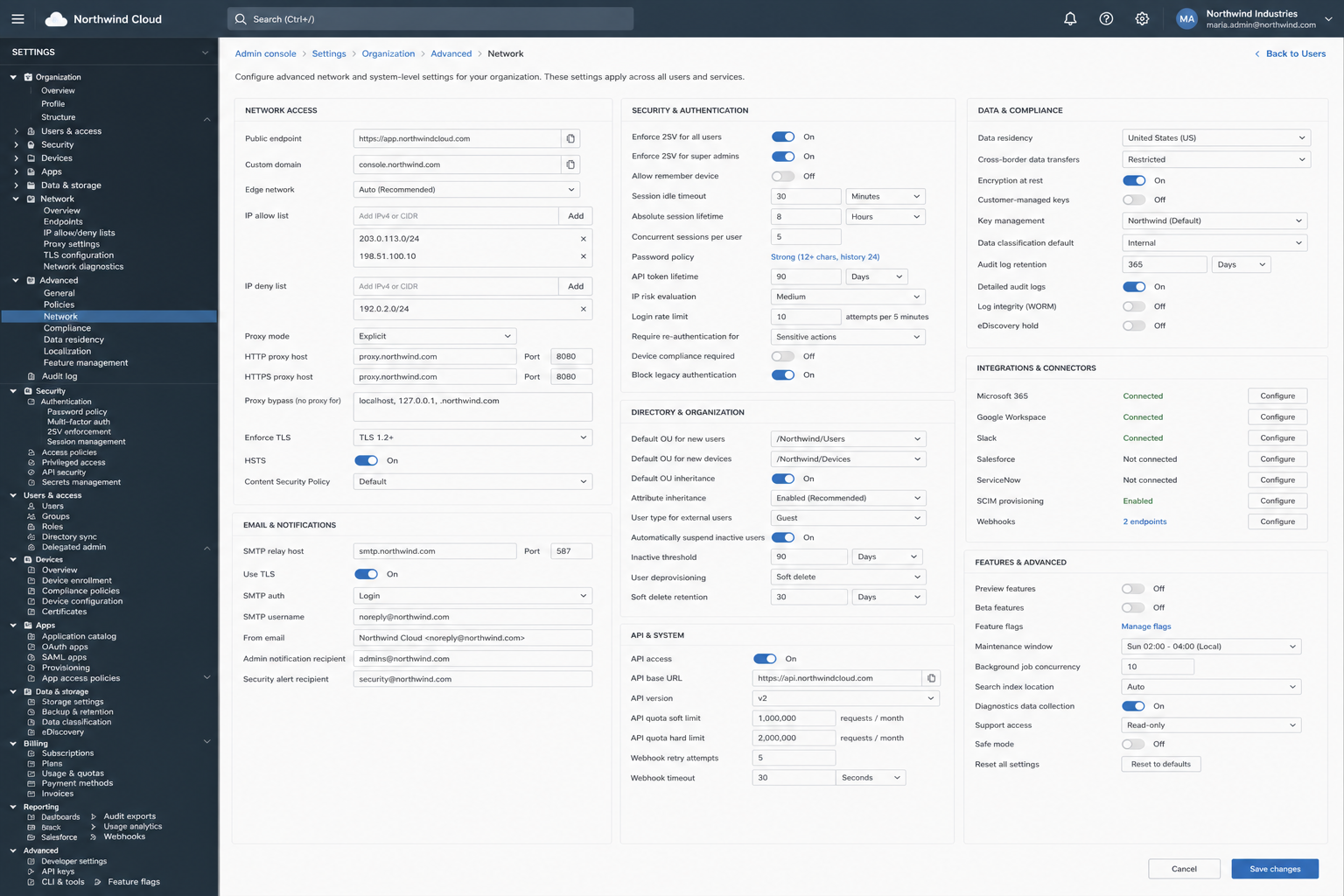
That layout is honest about inventory. It is dishonest about work. The admin who was looking at Ada Lovelace now holds Ada in working memory while hunting SMTP relay hosts and API quota soft limits. The setting never meets the object it governs in the same field of view.
Settings beside the activity
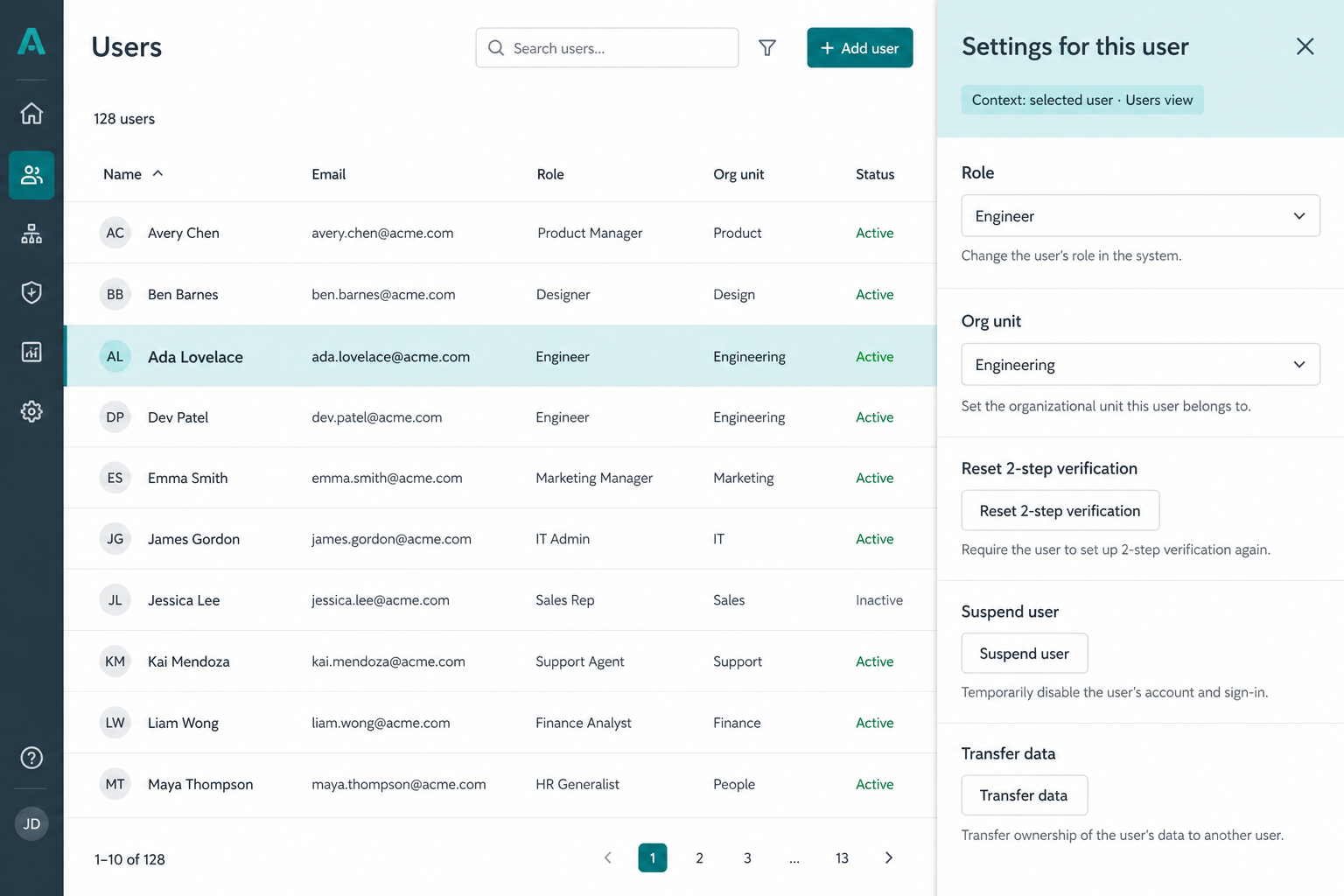
Keep the activity. Bind a settings surface to it. When a user row is selected, the dependent pane shows settings for this user — role, org unit, 2SV reset, suspend, transfer — each with a plain line of consequence. Context is named in the chrome so the bind is visible, not magical.
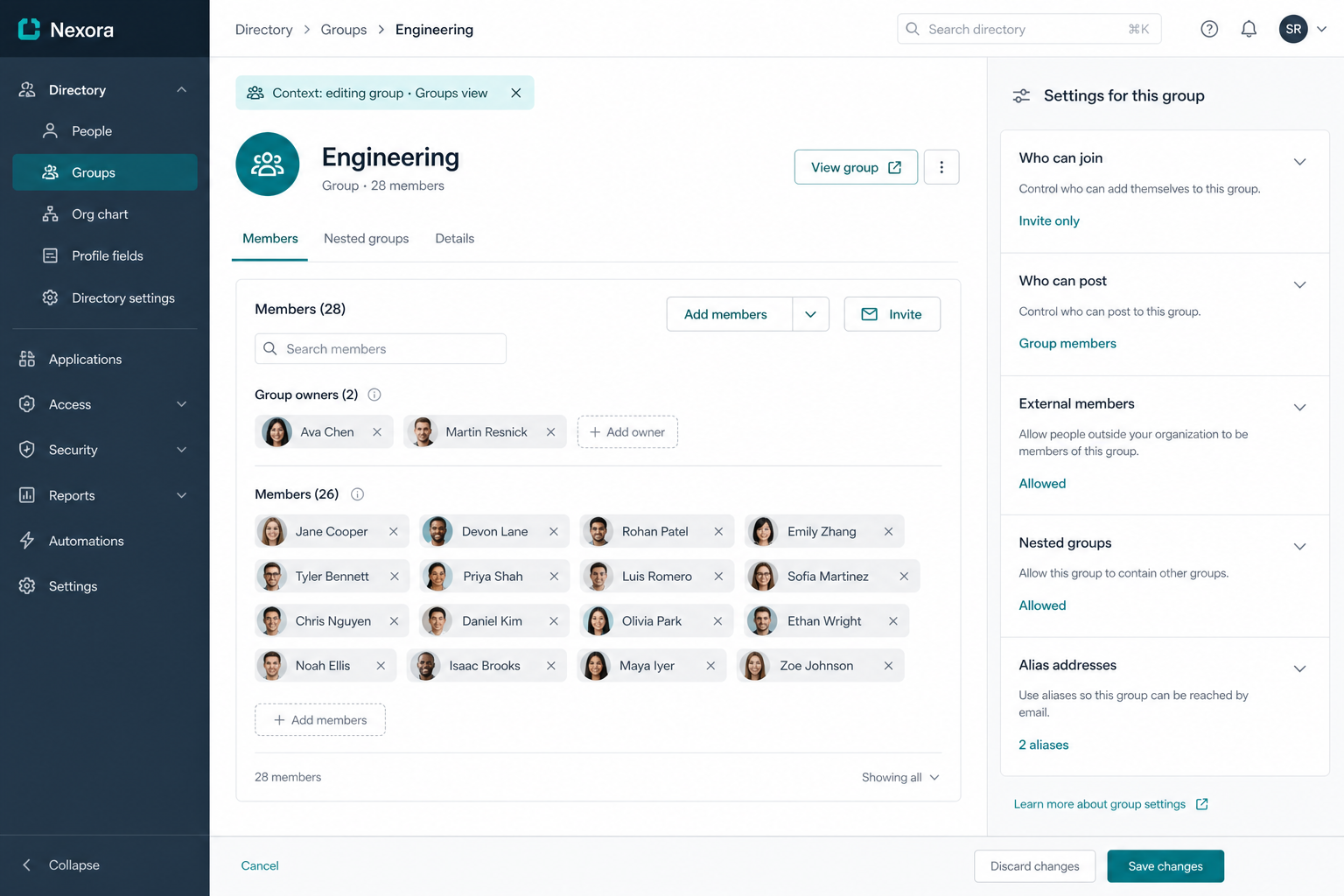
Change the activity state — editing a group instead of a user — and the same pane reshapes. Membership stays in the main plane; join rules, posting rights, external members, aliases sit beside it. You do not leave Engineering to find Engineering’s policy.
This is already approximated in places: Figma’s properties panel, IDE inspectors, macOS Get Info, Windows property sheets. Those are selection-bound property editors. The claim here is stronger and more general: standardize activity-state → applicability → settings presentation as a first-class paradigm for admin consoles and multi-state web apps — not only for “the selected vector shape,” but for every durable context the main UI can be in.
What has to be true underneath
The paradigm violates the usual settings architecture. A flat catalog behind a gear icon does not need to know what you are doing. A dependent settings process does.
Architecturally it looks like this:
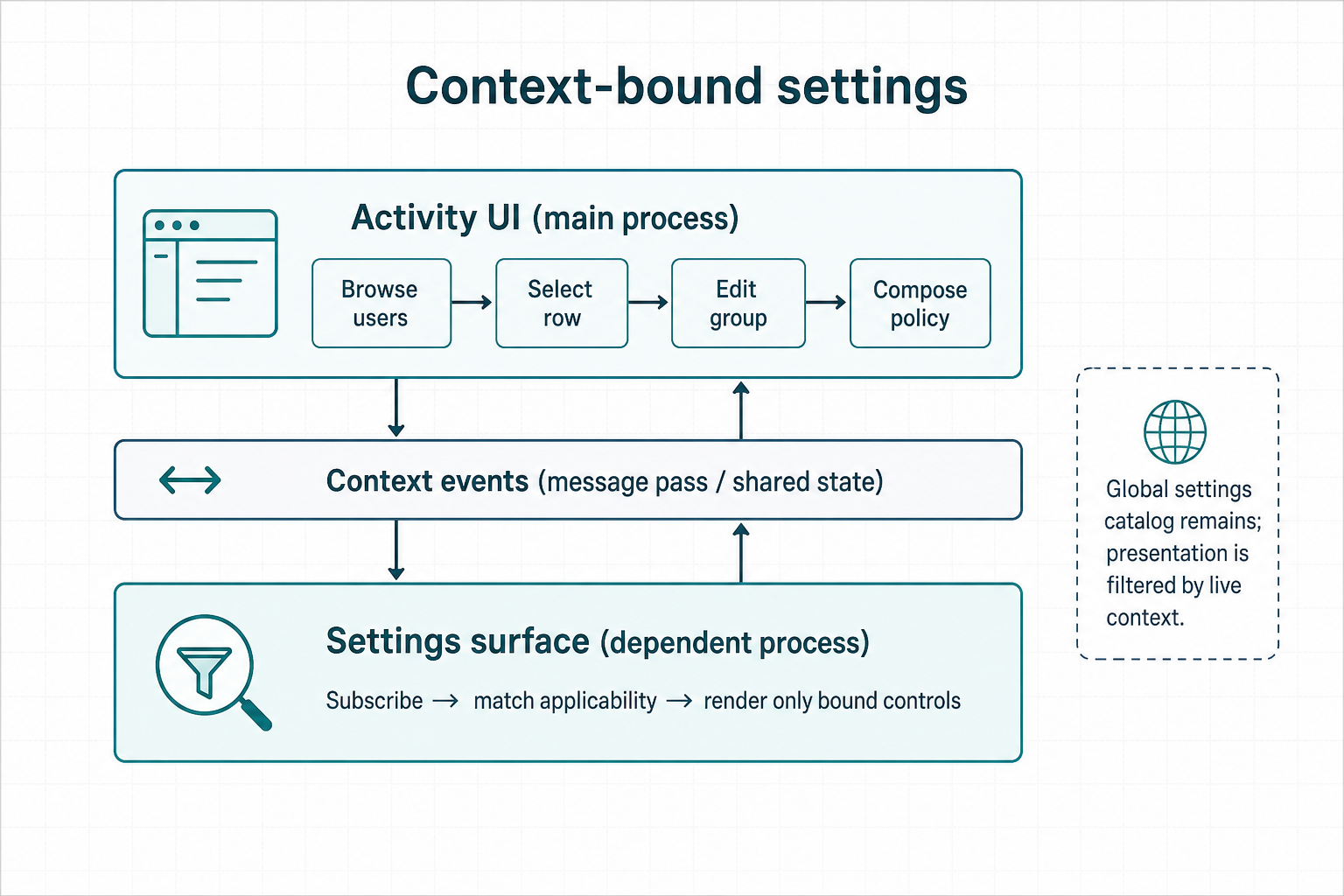
In practice:
- Activity UI publishes context: view, selection, edit mode, policy draft, wizard step.
- Context bus carries those events — in-process store, message pass, or shared memory / IPC when shells split.
- Settings surface subscribes, matches each setting’s applicability predicate, and renders only the bound set — still backed by the global catalog.
The catalog does not disappear. Global search, audit, and power-user jumps still need a full map. What changes is the default altitude: settings arrive as a dependent view of live work, not as a pilgrimage.
Reactivity between processes is not optional decoration. If the activity moves and the settings pane stays frozen on the previous object, you have reinvented a modal with worse manners.
Prior art and near neighbors
This is not invented from nothing. It sits on a long shelf of related ideas — and differs from each in a sharp way.
| Neighbor | What it gets right | Where it stops short |
|---|---|---|
| Property sheets / inspectors | Selection owns the form | Often object-attrs only; whole-app “Settings” stays across town |
| Figma / design-tool properties | Live bind to selection; separate from canvas | Domain is document objects, not admin activity states |
| Context-aware computing (IxDF encyclopedia) | UI can optimize for runtime situation | Classic literature leans sensors and environment; less on settings-as-dependent-process |
| Adaptive UI / ECA models | Event → condition → action at runtime | Often mutates the same chrome; we keep activity and settings as two surfaces with a contract |
| Suchman — situated action | Meaning is local to the situation of use | Critique of plans for designers; we want the system to stay situated while the user configures |
| Lieberman & Selker — Out of context | Systems that adapt to and learn from context; COACH-style contextual help | Help and adaptation ≠ a standardized settings bind |
| Shneiderman — direct manipulation | Visibility of objects; continuous feedback | Settings that leave the scene break that visibility |
| Progressive disclosure / scoped UX | Budget attention; narrow tools | Complementary — scoped tools make applicability predicates believable |
The blurry boundary in GUI design is exactly here: when does a control belong beside the work, and when does it belong in the catalog? Industry default answers “catalog,” then wonders why admins cannot predict outcomes. Context-bound settings flip the default without deleting the catalog.
Risks worth naming
Adaptive placement can punish spatial memory if causality is opaque. Name the bind. Prefer stable slots inside the pane. Do not reshuffle every keystroke — reshuffle on meaningful context transitions (selection change, view change, mode change). Keep an escape hatch to the full catalog. Pair with source-of-truth honesty: the pane must reflect real config, with jump-to-JSON or policy source when the file is authority.
Where to go next
The idea is the bind: settings as a dependent process that follows activity state. Recipes, non-goals, and a live desk live in the docs and demo — not only in this framing.
- Docs — Context-bound settings
- Demo — Context-bound settings desk
- Sibling — Many small tools under one roof (narrow scopes make honest applicability possible)